Creating Project |
  
|
Creating Project |
|
To create new project in AlterPhoto Photo Editor, select in the main menu: File -> New...
On the window you need to specify the Width, Height of new image.
You can do it manually, or use one of templates available on the left part of the window.
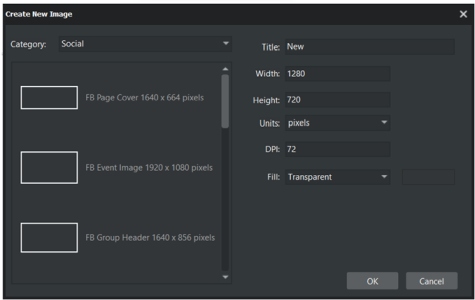
You can use different Units: Pixels, Inches, Centimeters, Millimeters.
When you use Units other than pixels, make sure you specified correct DPI value. When you change the Units, the Width and Height are recalculated automatically.
In the "Fill" combo you can specify how the background of new image is filled.